Call Tracking Numbers: Local vs Toll-Free and How to Use Them
Every call tracking setup starts with the same building block: the tracking number. It is the piece that makes the whole system work, yet it is the part most people skip past on their way to the dashboards.
Getting your numbers right saves money and gives you cleaner data. This guide explains what a call tracking number actually is, how local and toll-free options compare, how many you really need, and how to assign them so the data means something. If call tracking itself is new to you, our guide on what call tracking is is a good place to start first.
What Is a Call Tracking Number?
A call tracking number is a real, dialable phone number that you point at a marketing source. When someone calls it, the platform records the source, then forwards the call to your regular business line. The caller reaches you as normal and never knows the call was tracked.
The number is the label. Whatever source you assign it to, every call to that number gets credited to that source. That is the simple mechanic behind all of call tracking, and we walk through the full flow in our article on how call tracking works.
Local vs Toll-Free Numbers
When you provision a tracking number, you usually choose between a local number and a toll-free number. Both forward calls the same way. The difference is how callers perceive them.
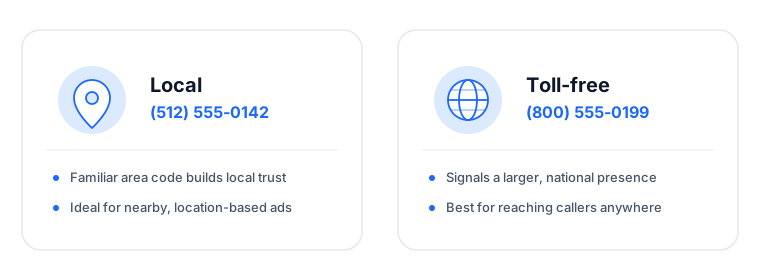
Local numbers carry an area code from a specific region. They feel familiar and nearby, which tends to lift answer rates for businesses that serve a defined geographic area. A plumber, a dental office, or a regional law firm usually wants callers to see a number that looks like a neighbor.
Toll-free numbers use prefixes like 800 or 888. They signal a larger, established operation and reassure callers that the call costs them nothing. National brands, support lines, and businesses that serve customers across many regions often prefer them.
There is no universally correct choice. Match the number to how you want to be seen. If you sell locally, lean local. If you sell nationally or want an established feel, lean toll-free. Many businesses use a mix.
How Many Numbers Do You Need?
This is where people either overspend or undercount. The answer depends on what you are tracking.
For offline and static channels, you generally want one number per source you care about. A billboard, a direct mail piece, a vehicle wrap, and a printed directory listing might each get their own number so you can compare them cleanly.
For website traffic, you do not need a number for every visitor or even every campaign. A technique called dynamic number insertion shows different numbers to different visitors from a small shared pool, based on how each person arrived. That lets you track many online sources without buying many numbers. Our article on dynamic number insertion explains the approach, and our guide to website call tracking shows where it fits.
The practical rule: buy dedicated numbers for the offline channels you want to compare, and use dynamic insertion to cover the web.
Assigning Numbers So the Data Is Useful
A tracking number only tells you something if it maps cleanly to one source. A few habits keep your data trustworthy.
Keep one number to one source. The moment you reuse a number across two campaigns, you lose the ability to tell them apart.
Label numbers clearly in your dashboard. Name them for the source, not the digits, so your reports read like sentences instead of a phone book.
Route them thoughtfully. Numbers do not just track, they route. You can send calls to different people based on the source or the time of day, and play a short call whisper so whoever answers knows where the call came from before they speak.
Feed the data into your reports. The point of all this labeling is attribution. When each number maps to a source, you can connect calls back to the campaigns that drove them, which is the foundation of phone call attribution.
Numbers and Paid Advertising
If you run paid search, tracking numbers do more than separate channels. Combined with dynamic insertion, they let you tie a call back to the specific keyword and campaign that produced it. That keyword-level view is what makes PPC call tracking worth setting up, because it shows you which search terms drive calls and which only drain budget.
Getting Your First Numbers
You can start small. Pick one channel, provision a single number, and watch what comes in over a couple of weeks. Once you trust the data, expand to the channels and campaigns that matter most.
When you are ready, you can see the full set of tracking, routing, and reporting tools on the Analytic Call Tracking page, or start a free trial and claim your first tracking number today. The right numbers, assigned well, turn every inbound call into something you can measure.
Call Tracking Software for…
SEO & PPC
End the uncertainty of marketing campaigns with Analytic Call Tracking.
Try FREE for 15 daysNo credit card required. Cancel anytime.